Trusted Gateway
The diagnostic API is intended to reveal protected data only to requests that have passed through a trusted gateway. Review the proxy configuration and test whether an external client can supply the same trust signal.
Objective
By completing this module, you will be able to:
- trace how a reverse proxy derives and forwards a request header;
- test whether an API treats client-controlled metadata as authorization; and
- recommend a trust-boundary design that distinguishes an intermediary's assertion from untrusted input.
Before you begin
Open Trusted Gateway and download the proxy configuration. Use the same browser session throughout the test. Review Send a custom header and Keep the same Pocket CTF session.
Send one request at a time. Do not scan paths or automate guesses: the evidence file and the endpoint response contain the information needed for a controlled comparison.
Concepts
A reverse proxy sits between a client and an application. It can remove untrusted headers, authenticate a connection, and add a new internal assertion. The application may rely on that assertion only when clients cannot reach it through another path or supply the same value themselves.
A header name does not make its contents trustworthy. If a proxy maps an incoming client header directly to the internal authorization signal, an external requester may cross the trust boundary by reproducing the input. Server-side access control should rely on an authenticated intermediary channel or perform its own authorization.
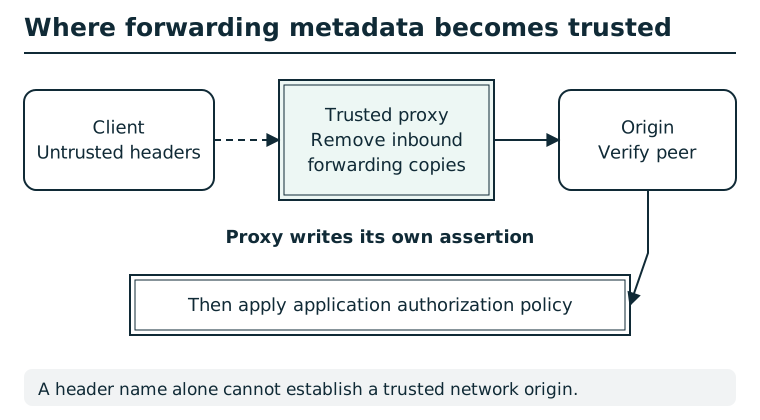
A forwarding header begins as client input. A trusted proxy removes inbound copies, writes its own assertion, and uses a controlled connection to the origin. The origin verifies that peer before interpreting the assertion; application authorization is still a separate decision.
Suggested tools
- Text editor: Follow the configuration from the incoming header variable, through any mapping rule, to the header forwarded upstream.
- HTTP client: Browser developer tools,
curl, or another instructor-approved client can compare the ordinary request with one controlled custom-header change. Preserve thepctf_sessioncookie.
Tool practice
Rehearse the worked tool exercise before using challenge data.
Capture the baseline with the current session cookie. Read a map as input variable → matching value → output marker, then find where that marker is forwarded. Send one custom-header request with the same cookie and compare the complete response bodies.
Investigation
Observe
Request the diagnostic endpoint normally and inventory the JSON fields without assuming an empty protected field means the route is broken. In the proxy file, identify:
- the incoming client-controlled variable;
- the values accepted by the mapping rule;
- the internal marker produced by that map; and
- the header sent to the upstream application.
Form a hypothesis
Does the proxy replace an untrusted assertion with independently established identity, or transform the client's own header into a trusted marker? If the client supplies the mapped value, what change should appear in the diagnostic response?
Test carefully
Make a baseline request in the current session. Then repeat it with only the header and value indicated by the configuration changed. Compare the complete JSON responses and record the authorization difference. Do not add unrelated headers or send concurrent requests.
Submit the current diagnostic code revealed by the controlled test and select the trust flaw demonstrated by the configuration and response. The code is session-specific, so copying another learner's result will not reproduce your evidence.
Progressive hints
Hint 1
Compare the diagnostic response before changing anything with the map and proxy_set_header directives in the configuration.
Hint 2
The variable at the start of the map represents a request header supplied by the client. Follow the mapped value into the header forwarded upstream.
Hint 3
Repeat the diagnostic request with exactly the incoming header name and mapped value shown by the configuration. Preserve your session, then compare the JSON field that was unavailable in the baseline response.
Troubleshooting and reset
If both responses look the same, confirm the header spelling and value against the configuration and ensure the request uses your current session cookie. In curl, quote each complete header argument after -H; options may appear before or after the URL. If the code changes because you started a new browser session, repeat the controlled request and submit the code from that same session.
Completing the finding reveals a seal; file it on the River Station incident board to record progress.